Thursday, November 28, 2019

Math Facts

Mathematical Facts

1.
 The word “hundred” comes from the old Norse term, “hundrath”, which actually means 120 and not 100.
2. In a room of 23 people there’s a 50% chance that two people have the same birthday.
3. Most mathematical symbols weren’t invented until the 16th century. Before that, equations were written in words.
4. “Forty” is the only number that is spelt with letters arranged in alphabetical order.
speed limit 40 sign
5. Conversely, “one” is the only number that is spelt with letters arranged in descending order.

Wednesday, November 27, 2019

Riddle no. 3

Image result for maths riddles

Answer:
We have 3 equations;
Lion + Elephant = 6
Hippo + Lion = 10
Elephant + Hippo = 8
Adding all 3 of them we get;
2(lion) + 2(elephant) + 2(hippo) = 24
Solving it we get;
2(lion + elephant + hippo) = 24
(lion + elephant + hippo) = 24/2 = 12
Therefore;
Lion + Elephant + Hippo = 12

Maths RIDDLE

Guess the result of 423. 4 may mean something, 2 might mean something, 3 may mean something. Be the first to solve!

Image result for maths riddles


Result =
first digit * first digit
third digit * third digit

398 = 964 (3*3 8*8)
118 = 164 (1*1 8*8)
356 = 936 (3*3 6*6)
423 = 169 (4*4 3*3)

Monday, November 25, 2019

MATHS PUZZLE NO.1

MATHS PUZZLE


Image result for maths puzzle

WHAT IS (?) 

The ans is
(3-2) = 1
1x12 = 12

Exercise 2

HOW TO USE i-PAD ?
This article explains the basics of iPad ownership. It should be perfect for the beginners and the newcomers, but we think everyone will find something here they didn't know before. If you'd prefer some buying advice, try our iPad buying guide and roundup of the best iPad deals.
An iPad has very few buttons: there's the Home button on the front, below the screen; the power button, at the top right; volume buttons, on the righthand edge; and possibly (depending on the model) a mute switch, next to the volume buttons.


You can press the power button to enter sleep mode (which will be disturbed if any notifications come through - new iMessages and so on). To power off completely, hold down the power button for about rive seconds, until you see 'slide to power off' at top of the screen. Swipe your finger across this to power off.
If you've got a brand-new iPad (or one you've inherited from someone else) then you'll need to set it up. This includes connecting to a Wi-Fi network, entering or creating an Apple ID, choosing a passcode, setting up Touch ID and selecting various options.
We walk you through this process in a separate article: How to set up a new iPad. We'll be ready for you when you come back.
You will have been encouraged to set a passcode as part of the setup process, and you may have entered your fingerprint for Touch ID, too (although some older iPads don't have fingerprint scanners).
When you wake the iPad from sleep, by default you will have to enter the passcode or appropriate fingerprint to unlock it. (You can turn this off by opening the Settings app, tapping Touch ID & Passcode, entering your passcode, and tapping Turn Passcode Off. But we don't recommend it.)
Other accessories, like a case or cover for your iPad, are sold separately. If you don't have one yet, now's the time to look for something that fits your style, budget, and personal needs. The Apple Store has several options to choose from, including the popular Smart Cover. The Smart Cover was designed specifically for the iPad and can also be used as a stand.
If you're not interested in the Smart Cover (or any of the cases in the Apple Store), don't worry—you can find hundreds of alternatives if you search online or in retail stores. No matter what you choose, a good case or cover will go a long way toward protecting your device so you can enjoy it for years to come.

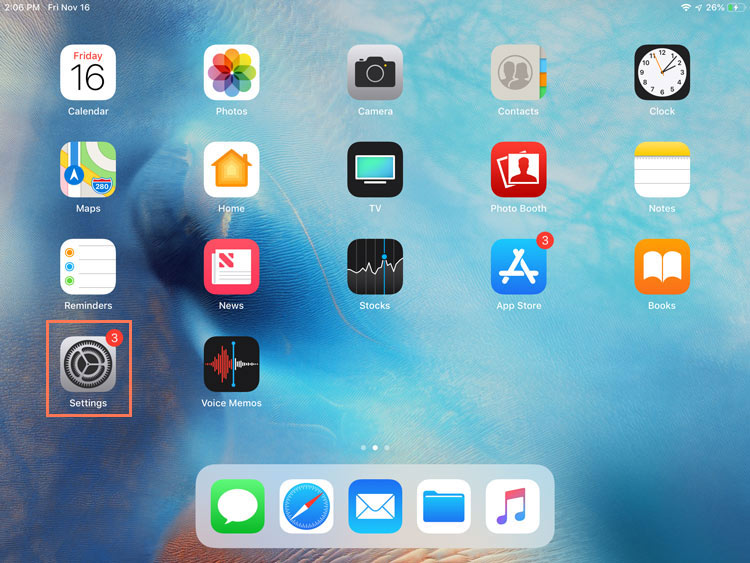
To turn Wi-Fi on or off:

  1. Tap the Settings icon on the Home screen.
  2. HOW TO USE i-PAD : THE BASIC VIDEO TUTORIAL
  3. How to wipe an iPad

    If you're selling on your iPad, or just want to wipe it and start again (which can occasionally fix persistent problems), open the Settings app and go to General > Reset > Erase All Content and Settings. There will be a number of warnings before the iPad is actually wiped.

Monday, November 4, 2019

Exercise 1


Computer Knowledge – Main Parts of Computer. Hardware. Computer hardware is what you can physically touch includes the computer case, monitor, keyboard, and mouse. It also includes all the parts inside the computer case, such as the hard disk drive, motherboard, video card, and many others.
In today’s day and age the computer is a permanent fixture to your home and business. It is your window to a larger world, or a box that confines you. Understanding how to operate a computer correctly and efficiently does not only give you access to all of the information at the ends of the earth, but will open doors for you in your work life, social life, and love life. For this You will need to understand computer essentials.
The essential knowledge on how to operate a computer involves these key components:
  • Keyboard
  • Mouse
  • CPU (Central Processing Unit)
  • Monitor
  • Speakers
  • Printer
  • Operating System
Once you have these key components, you have what you need to begin learning to use one the most important social networking devices of the 20th Century. Whether you are a little older, a young child, or a business entrepreneur, you can benefit from learning to use a computer properly and efficiently. To get started first make sure the cord is firmly plugged into the power outlet and you have no loose or unplugged wires. Once you have determined that everything is in order, you can power on the machine.